Thursday, November 4, 2010

WEN YONG -WORK PART 2 (Peacock+Elephant)

Step 1, open a peacock image.

Step 2, open a elephant image.

Step 3, Arrange them by using Free Transform (Ctrl+T)

Step 4, Zoom in for more details.

Step 5, Combine the 2 edge by using Clone Stamp Tool. 

Step 6, This is what happen after using the Clone Stamp Tool.

Step 7, Repeat the same step to merge all the edges. And here we done.

Wednesday, November 3, 2010

ZO-WORK PART 1

STEP 1 --- Open the leopard image which I saved from internet.


STEP 2 --- Double click the BACKGROUND layer and a NEW LAYER box pop-up. I changed the layer name to LEOPARD, then click OK.


STEP 3 --- Click CREATE A NEW LAYER button at the bottom of the layer panel box to create a new layer and name it LAYER 1.


STEP 4 --- Click the PAINT BUCKET TOOL button or press G, select red colour as the foreground colour, click the paper to drop color. I choose red colour because it is contrast to the image so I can see the image clearly after erased.


Now, I can see my layers like this.


STEP 5 --- Select ERASER tool or press E button, then start dragging the mouse to erase the part which is not needed. Zoom in image into very large size and set the diameter of the eraser into small size so I can get smooth image when I zoom out. Actually, I could use MAGIC WAND to cut, but I didn't. This is because I think its hard for us to control the magic wand. We will get rough edges after cutting. Eraser tools  take longer time but its worth because the edges are smoother.


My leopard image looks like this.

Save this file with new file name.

 
TO BE CONTINUED...

Thursday, October 28, 2010

FOURTH MEETING 28102010


The list of the 12 animals crossbreed:

1. Leopard + Bat 2. Bird + Monkey *by Zo
3. Elephant + Deer 4. Frog + Crocodile *by Wen Yong
5. Whale + Zebra 6. Crab + Bull *by Samuel
7. Chameleon + Porcupine 8. Ostrich + Cobra *by Kenta
9. Penguin + Dove 10. Dog + Seal *by Kenny
11. Rhino + Sea Lion 12. Giraffe + Tiger *by Jason

YEAH!
We plan to rush up the drafts before next Thursday...

3.54pm, 28102010
DR1004

Thursday, October 21, 2010

THIRD MEETING.

Date:21/10/2010
Venue:DR0001

Discussion:
We decided the theme of our calender by using primary idea - Animal Crossbreed.

We will come out with 12 different designs of Animal Crossbreed represented by 12 months.

Wednesday, October 20, 2010

Primary Idea. WEN YONG -WORK PART 1 (Elephant+Leopard)


After having our first meeting today, our group, TwoPointSix came out a primary idea of our calender design.

Animal Crossbreed.

Thats our primary idea!

This is our maiden try-out by using Adobe Photoshop CS5.
We are going to combine an elephant with leopard skin and this is the final product.


First and most important is to find the proper source images. I chose these 2 because it is fun and interesting. Since I liked the high contrast color of the leopard, I decided to use the actual fur and "mold" it over the elephant's body.
So with that said, I extracted the leopard and pasted it into the elephant file on a new layer.
NOTE: It's a good idea to use a hi-r es image because when you're stretching pixels, a low resolution file is going to lose its realism.


Step 1, create a new horizontal A4 file.


Step 2, paste the elephant file, then the leopard skin in a new layer.Then, lower the opacity of leopard skin and compare it to the elephant's background.

Step 3, erase the unwanted part by using the Eraser Tool (E).
_________________________________________________


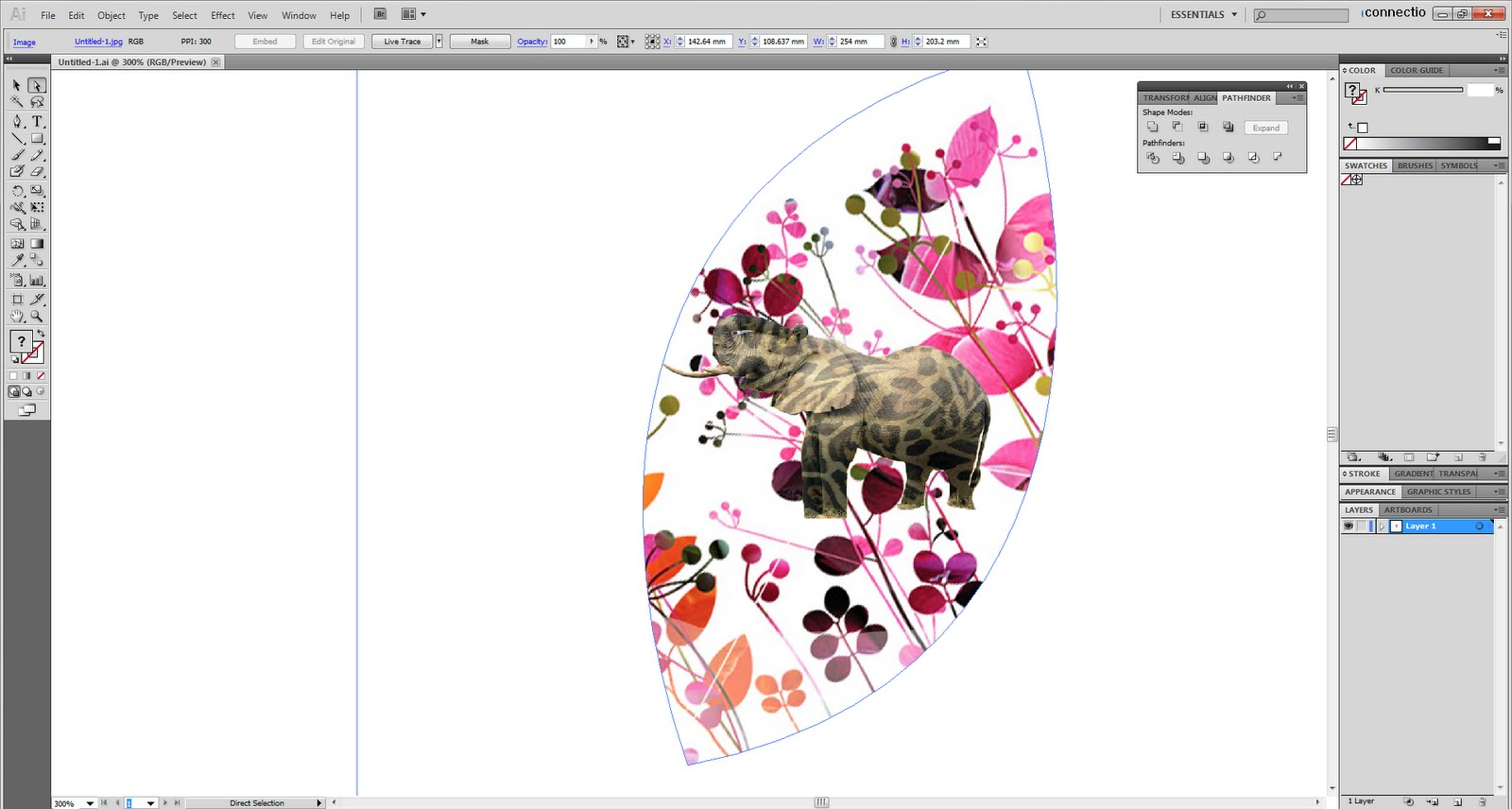
Then, I'll add a background by using Adobe Illustrator CS5.

Step 1, copy the elephant by using Quick Selection Tool ( W ) in Adobe Photoshop CS5. After that, paste it on a horizontal A4 file in Adobe Illustr ator CS5. Then add a flower picture as background.


Step 2, create a frame using Shape Tool and Pathfinder Tool.


Step 3, Crop it out using Crop Tool and transfer to Adobe Photoshop CS5.


Step 4, add another new layer for adjustment of brightness and contrast of the elephant to make it pinkish and blend with the background.


100% Done !


This is the comparison of the original elephant and the pinkish elephant.


Heres another design that I made.


BY: TANWENYONG http://freakyspacemonkey.blogspot.com/

Tuesday, October 19, 2010

Monday, October 18, 2010

FORMATION OF GROUP AND BLOG


After having our first meeting, our group name was formed, TwoPointSix. Our blog was released at the same day too.